Controls and Hotkeys in Anime CardVerse
PC keys, touch and console habits, Codes button, combat menus, and private-server practice loops.
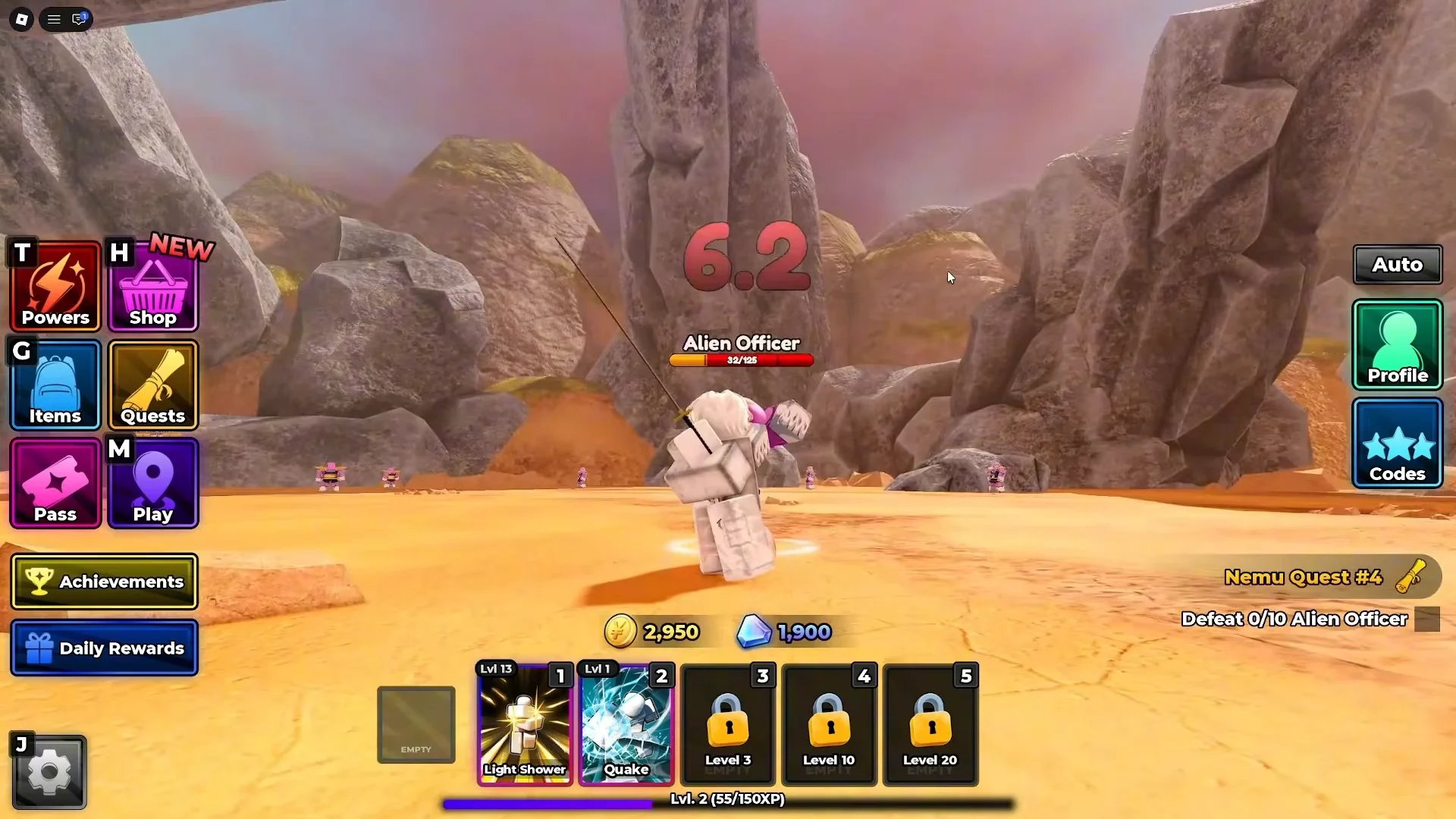
Anime CardVerse is a Roblox action RPG by Polnareffini Studios where every summoned card is a combat Power on your hotbar. Bad inputs waste more time than bad rarity luck. This controls guide covers the PC hotkey map, Mobile / Tablet / Console habits, where the Codes button lives, how T / G / M / J open your real menus, and how to practice combat in a free private server before you blame the kit.
The game launched November 21, 2026 and runs on Mobile, Tablet, PC, and Console. Join here: Anime CardVerse on Roblox. If you still need the first-session loop, pair this page with Getting Started. For execution habits beyond keys, skim the Players Hub.
Core PC hotkeys
Memorize these four before inventing macros:
| Key | Opens |
|---|---|
| J | Settings |
| T | Powers (combat hotbar cards) |
| G | Weapons |
| M | Worlds menu |
T and G are the combat identity of the account. Early on you often equip only two Powers; slot unlocks expand the hotbar as you level — slot 2 at level 3, slot 3 at level 10, slot 4 at level 20, up to five hotbar slots. Do not stare at empty slots wondering why you cannot fill five Mythics on day one.
M is how you confirm you are still in World 1 — Nemu’s Village (desert start) versus Hollow World or Demon Citadel. Wrong world assumptions cause “my kit feels weak” tickets that are really navigation mistakes.
J is your stability panel: graphics, sensitivity, and input feel. Lower effects on weak Mobile GPUs before you decide a Power animation is unreadable.
Codes button (right side)
Active freebies sit behind the Codes button on the right side of the screen — same utility side as several other panels. Redeem before a big summon night. As of November 24, 2026:
| Code | Status |
|---|---|
Release | Active (never expires) |
2KCCU | Active (expires Dec 6) |
SorryRestart1 | Active (expires Nov 25) |
SorryFor1DayDelay | Expired Nov 23 |
Full tables and reward notes live on the Codes Hub. Type codes exactly; case and spacing matter.
Mobile and tablet tips
Touch players should rebuild the same mental model even when keys differ:
- Find Settings, Powers, Weapons, Worlds, and Codes once, then bookmark the muscle memory.
- Prefer readable AoE Powers over ultra-busy VFX spam until you raise graphics comfort.
- Use larger tap targets — do not try to micro-swap five cards mid-wave if two clean buttons win the Act.
- Sit in a free private server for ten minutes of Power drills before public Mission pressure.
Tablets often feel like a middle ground: more screen real estate than phones, less precision than mouse. Bind habits that keep Powers and Weapons one gesture away; never bury them behind nested menus during Gauntlet streaks.
Console tips
Console shares the same economy and modes. Map:
- One face / bumper path to Powers
- One path to Weapons
- One path to Worlds
- One path to Settings
- Confirm where Codes lives on the right-side utility cluster
Stick aiming and camera speed matter more than on PC for telegraphed bosses. If Challenges feel unfair, lower camera shake and practice the same Act twice in a private server before swapping the entire loadout.
Combat flow on every platform
A clean fight loop looks like this:
- Confirm world and mode (M).
- Open T, equip a coherent set (AoE + burst; see Best Loadouts).
- Open G, equip a weapon that matches the kit’s Physical or Magical fantasy.
- Enter World quests, Missions (wave Acts), Challenges, Gauntlet, or Invasions (level 15+).
- Between deaths, adjust one variable only — Power order, weapon, or positioning — not all three.
Powers are the hotbar cards. Weapons amplify patterns. Traits and cubes polish consistency at Kokushibo after you know which buttons you actually press. Do not reroll traits on a kit you cannot execute because menus still confuse you.
Slot unlock timeline
| Unlock | Level |
|---|---|
| Slot 2 | 3 |
| Slot 3 | 10 |
| Slot 4 | 20 |
| Hotbar cap | 5 slots |
Early accounts often run two Powers. That is normal. Depth comes from Ascension at Wish, Evolution at Moodaru, and better weapons — not from forcing empty slots with junk Rares. The weapons banner becomes more relevant as you progress into World 2 (Hollow World); until then, treat weapons as amplifiers, not lottery tickets.
Private server practice plan
Private servers are free. Use them to:
- Learn cancel timing on a new A-tier or S-tier Power without lobby chaos
- Test whether Mobile graphics make a kit unreadable
- Rehearse Mission Act wave pacing before a Challenge push
- Dry-run Invasion readiness after level 15 without public wipe shame
A twenty-minute private drill after redeeming codes beats three public wipe loops. When you are ready for harder mode structure, graduate to Gauntlet, Invasions & Challenges.
Gameplay overview video
The embedded overview mid-article shows real Powers and Weapons UI pacing. Watch it after you have opened T and G once so the labels match clicks you already made.
Platform checklist before blaming the meta
- J settings feel stable (FPS / effects / sensitivity)
- Codes redeemed from the right-side button
- T hotbar has intentional Powers, not inventory spam
- G weapon matches the kit
- M confirms the correct world
- Private server practice done for any brand-new Secret or Mythic
Common control mistakes
- Hunting Codes in chat instead of the right-side UI button
- Never opening G, then wondering why damage feels soft
- Swapping Powers every death instead of learning one rotation
- Entering Invasions at 15 with tutorial menu confusion still intact
- Skipping private servers because “public is fine” while learning Catastrophe Moon cancels
- Pasting unknown executors for “auto hotkeys” — read Scripts as a warning page, not a shopping list
What to do next
- Finish this hotkey map in a private server.
- Redeem live codes on the Codes Hub.
- Build a starter kit with Best Loadouts.
- Push XP and modes with Level Up Fast and Worlds & Missions.
- Keep the Players Hub bookmarked for discipline habits.
Controls are the floor under every tier list claim. Learn J / T / G / M, redeem Codes on the right, practice privately, then let the kit earn its reputation.
Frequently Asked Questions
Quick answers to the most common questions.
What are the main Anime CardVerse PC hotkeys?
J opens Settings, T opens Powers, G opens Weapons, and M opens the Worlds menu. Learn those four before inventing macros.
Where is the Codes button?
On the right side of the screen. Redeem active codes there, then confirm status on the Codes Hub.
When do extra hotbar slots unlock?
Slot 2 at level 3, slot 3 at level 10, and slot 4 at level 20, up to five hotbar slots. Early play often uses two Powers.
Are private servers free for practice?
Yes. Free private servers are ideal for learning Power timing, testing Mobile graphics, and rehearsing Mission or Invasion pacing.
Do Mobile and Console use the same systems as PC?
Yes. Platforms share the same Powers economy and modes; only the input gestures change. Mirror Powers, Weapons, Worlds, Settings, and Codes.